11. Use the IF function to calculate the commissions for individual sales
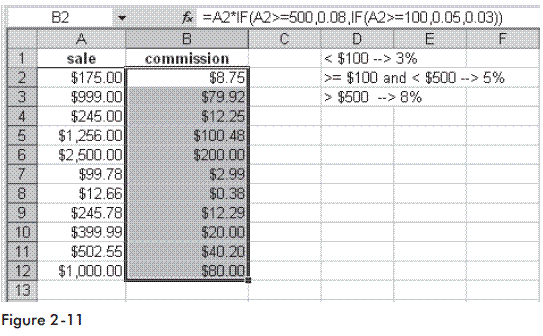
A company has a policy for individual commissions depending on sales, as shown below:
Sale < $100 3%
Sale => $100 and < $500 5%
Sale >= $500 8%
To calculate the commissions:
1. Enter different possible sales amounts in column A.
2. Select cells B2:B12 and type the following formula: =A2*IF(A2>=500,0.08,IF(A2>=100,0.05,0.03)).
3. Press <-Ctrl+Enter->.
Watch the Video Tutorial - https://www.youtube.com/watch?v=UZYtm0IN5YM
A company has a policy for individual commissions depending on sales, as shown below:
Sale < $100 3%
Sale => $100 and < $500 5%
Sale >= $500 8%
To calculate the commissions:
1. Enter different possible sales amounts in column A.
2. Select cells B2:B12 and type the following formula: =A2*IF(A2>=500,0.08,IF(A2>=100,0.05,0.03)).
3. Press <-Ctrl+Enter->.
Hope You Like This Tutorials - Give Comments
