Use the AND function to compare two columns
Two columns in a worksheet have to be evaluated. If the value in column A is greater than 20 and the value in column B is greater than 25, both values are valid.
To compare two columns:
1. In cells A2:A10, enter values from 1 to 100.
2. In cells B2:B10, enter values from 1 to 100.
3. Select cells C2:C10 and type the following formula: =AND(A2>20,B2>25).
4. Press <-Ctrl+Enter->.
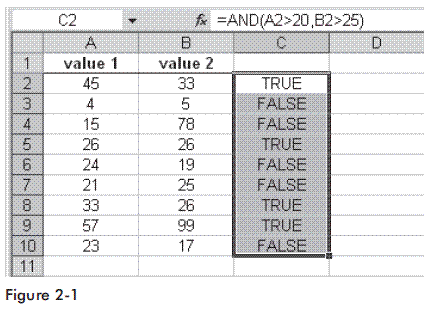
Note: If both criteria are valid, Excel shows the value as TRUE; otherwise it is FALSE.
Watch the Video Tutorial - https://www.youtube.com/watch?v=CG4gircKYs0
Hope You Like This Tutorial - Give Comments
